Projects Page
Create a Project | Organize and View a Project | Collaborate on Projects | Import Data Projects
Every Qualtrics session starts on the Projects page.
The Projects page serves as a central hub for viewing, managing, and accessing all your XM (experience management) projects, including the ones you’ve created and those shared with you. To access the Projects page, open the main navigation menu on any Qualtrics page and select Projects.
For more guidance on creating, organizing, searching, or collaborating on projects, check out the Projects Basic Overview help article.
Create a Project
A typical project includes a survey, a distribution record, responses, and reports. To make creating a new project easier, Qualtrics offers five ways to get started. You can create a project from:
- A blank survey
- A copy of an existing survey
- A solution template
- A template from your survey library
- An exported Qualtrics Survey Format (QSF) file
See the Creating a Project help article for more guidance on creating a project.
Organize and View a Project
The Projects page is designed to help you easily sort, manage, and access your work. Key features include:
- Ticket Tracking – Monitor any support tickets assigned to you or your team.
- Folders and Categories – Group projects by type or purpose.
- Expandable Views – Collapse or expand projects for a cleaner layout.
- Sorting Options – Sort by project name, type, or last modified date.
- Search Functionality – Quickly locate projects by name.
- Project Metrics – View summary data at a glance.
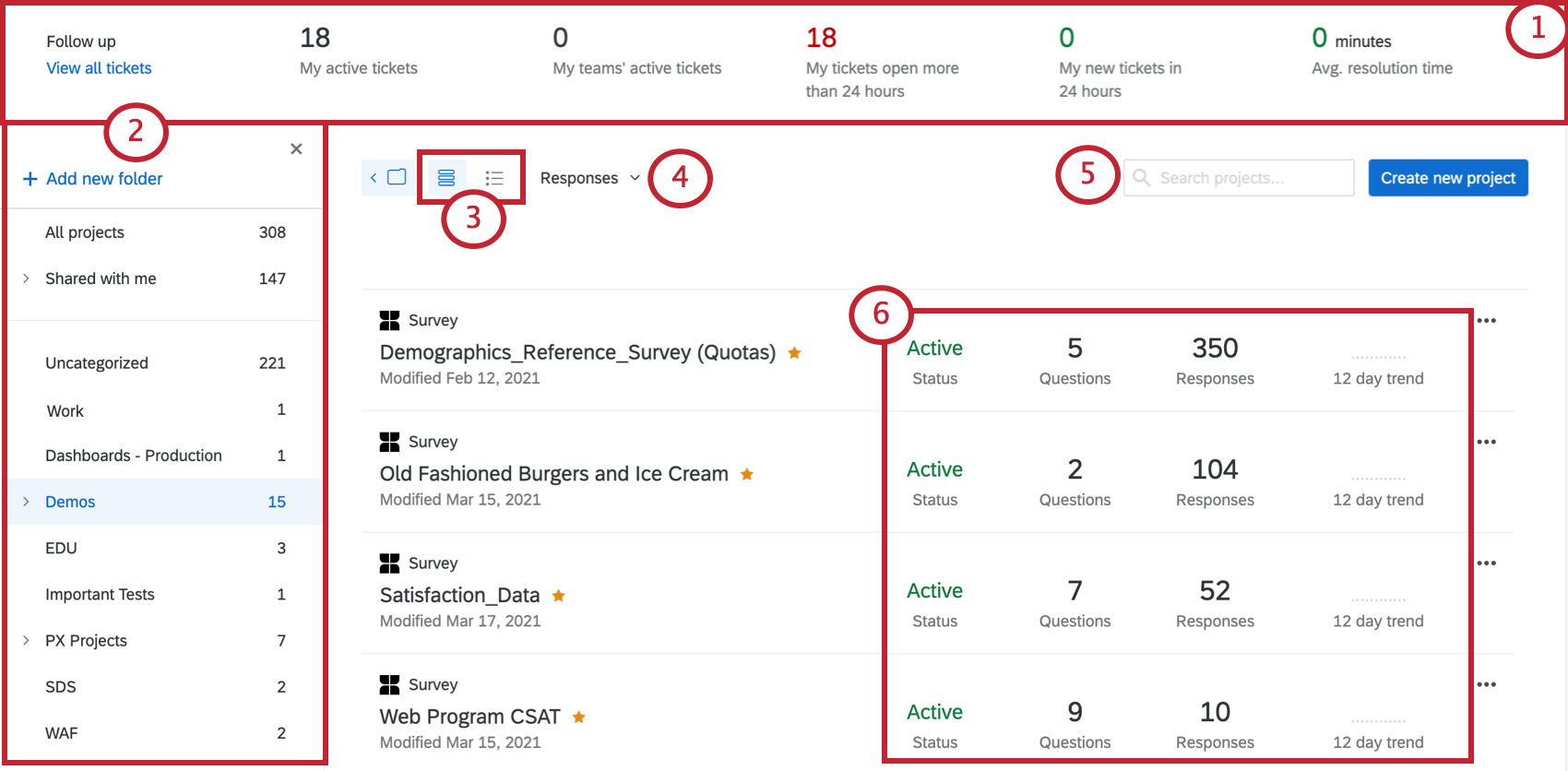
To the right of every project name, you’ll see three dots that open the project actions dropdown menu. Here you can
- Activate, rename, or delete projects
- Copy or edit surveys
- Translate content
- Access additional settings
Learn more in the Organizing & Viewing Your Projects help article.
Collaborate on Projects
Qualtrics makes it easy to collaborate with colleagues by sharing access to your projects. You can work together on surveys without sharing account credentials, and you can set specific permissions to control what each collaborator can do. For example, you might:
- Allow translators to upload translations without granting access to response data.
- Enable teammates to edit questions or analyze results collaboratively.
For more information, see the Collaborating on Projects help article.
Import Data Projects
Imported data projects allow you to use data from other external sources to analyze in Qualtrics. These project types are particularly useful for analyzing your operational data collected outside Qualtrics with your experience data collected inside Qualtrics.
For more guidance, visit the Imported Data Projects help article.