Reading Order
Order content so everyone can follow along.
Reading order is the sequence in which a screen reader or other assistive technology encounters content on a page, slide, or document. While sighted users can often determine how information is organized based on its visual layout, screen reader users generally encounter content one item at a time.
When the reading order does not follow a logical sequence, screen reader users may become confused, lost, or miss parts of the content entirely. This is particularly important in slideshow presentations and PDFs, where text boxes, images, shapes, and other objects may not be read in the same order they appear visually.
What are the Benefits of Reading Order?
Correctly setting the reading order of your document:
- Allows text-to-speech or screen reading software to read information sequentially.
- Ensures that keyboard and screen reader users can navigate menus, links, and form field items sequentially when using the tab key.
Reading Order Guidelines
Content should follow a logical and meaningful order when read from beginning to end.
- Keep the structure of your content simple and predictable.
- Place headings before the content they introduce.
- Keep related information together. For example, images and their accompanying text or captions should stay together.
- Use built-in layouts, headings, lists, tables, and other elements whenever possible.
- Be especially careful with content arranged in columns and/or placed in text boxes.
- Avoid using spaces, tabs, or empty text boxes to control the visual placement of information.
- Check the reading order after making significant changes to the layout.
- Mark decorative objects appropriately so they do not interrupt the reading order.
Do not assume that content is in the correct order simply because it appears correctly on the screen.
Reading Order Example
The following is a PowerPoint slide visually presenting workshop content.
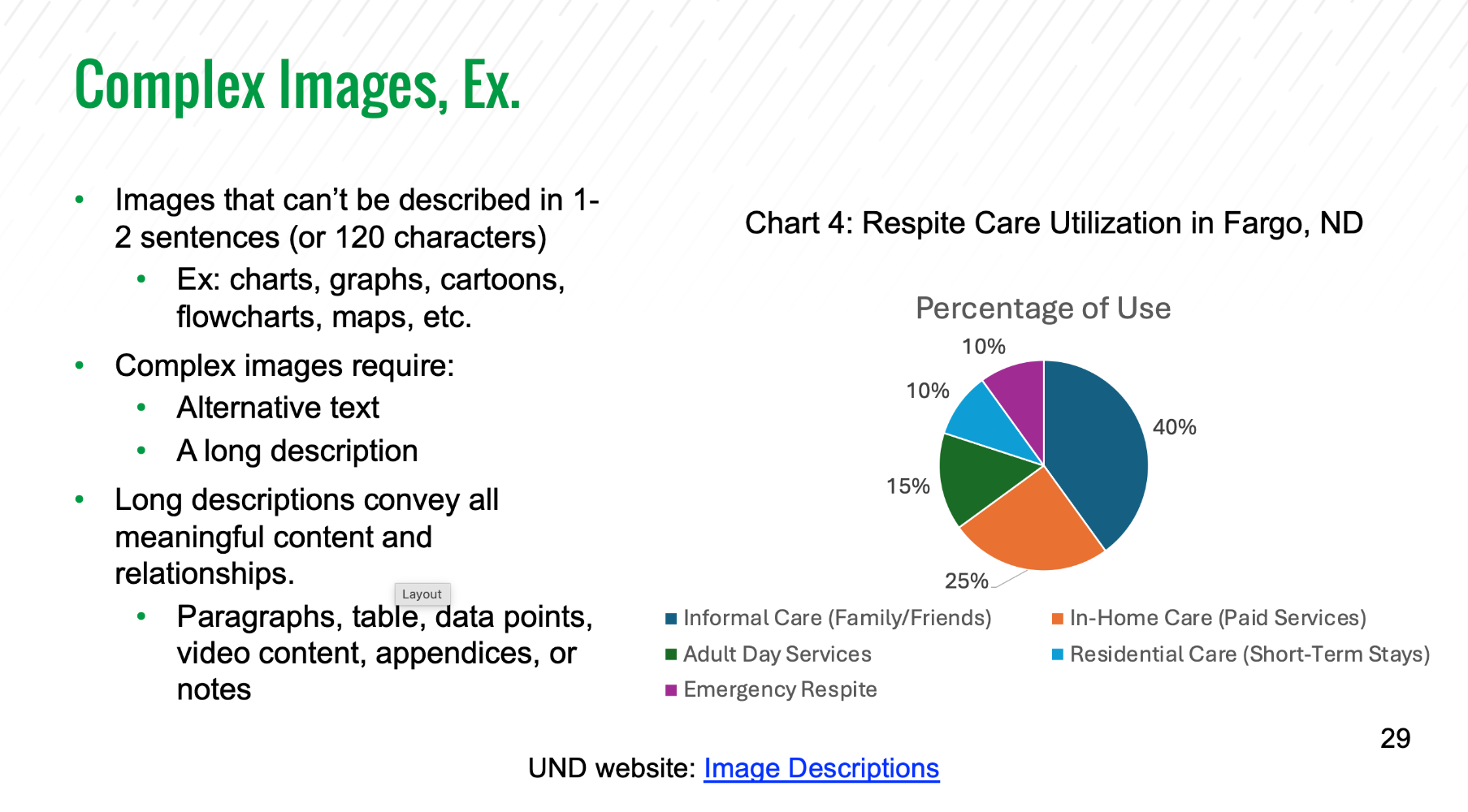
Visually, the slide has a clear order: the title appears first, followed by the bulleted content on the left, the chart on the right, and a resource link at the bottom. However, the PowerPoint Reading Order pane shows that the objects will not be presented to assistive technologies in the same logical order.
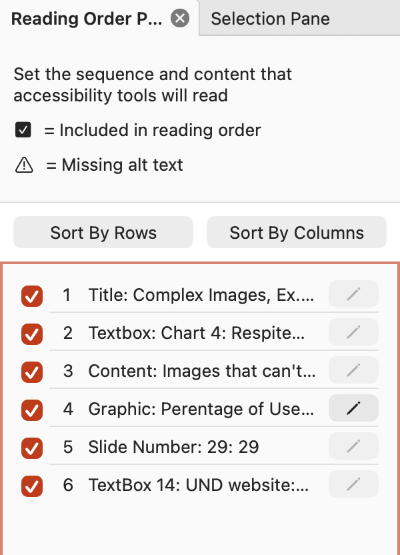
Compare the intended reading order with the actual reading order shown in the Reading Order pane.
Intended Reading Order (Correct)
- Title: Complex Images, Ex
- Content box: Images that can't be described...
- Textbox: Chart 4: Respite Care Utilization in Fargo, ND
- Graphic: Percentage of Use
- Textbox 14: UND website: Image Descriptions
- Slide number: 29
Actual Reading Order (Incorrect)
- Title: Complex Images, Ex
- Textbox: Chart 4: Respite Care Utilization in Fargo, ND
- Content box: Images that can't be described...
- Graphic: Percentage of Use
- Slide number: 29
- Textbox 14: UND website: Image Descriptions
In the incorrect reading order, the chart title is encountered before the content that introduces complex images, and the slide number interrupts the resource information. Rearranging these objects creates a more logical sequence for screen reader users.
Check Reading Order In...
Excel
Organize worksheet content so information follows a logical sequence in Microsoft Excel.